Cutting cable was supposed to be simple. For me, it wasn’t — at least not the first time I tried to get Romanian channels working over IPTV. The M3U URL I had kept timing out, the EPG wouldn’t load, and one provider I tried had Pro TV listed but it was actually a dead stream.
After testing three different IPTV services over a few weeks, here’s what actually works — and what nobody writing about this topic bothers to mention.
What IPTV Actually Is (Skip This If You Already Know)
IPTV delivers live television through your internet connection instead of a satellite dish or cable box. The stream comes in through your router, gets decoded by an app on your device, and plays like any other video.
What makes it different from just “streaming” is the live channel structure — you get an actual channel list, an electronic program guide (EPG), and real-time broadcasts, not just on-demand content.
For Romanian channels specifically, this matters because channels like Digi 24 and TVR1 run live news and scheduled programming. You want actual live TV behavior, not a glorified YouTube feed.
Why People Switch to IPTV for Romanian Content
This isn’t about price alone, though it does help. The bigger issue is availability.
If you’re outside Romania — whether you’re in the UK, Germany, or the US — you already know that Romanian broadcasters geo-block their own streaming apps. TVR+, Pro TV’s app, Antena Play — most of them detect your IP and block access the moment you’re outside the country.
IPTV services route the stream differently. You’re not hitting the broadcaster’s website directly, so the geo-restriction doesn’t apply in the same way.
Other reasons people switch:
- Multi-device access — the same subscription usually works on 2–5 devices simultaneously
- No contracts — most providers let you pay month-to-month
- HD and occasionally 4K streams — for popular channels like Pro TV, HD is standard on decent providers
- Catch-up / VOD — some providers include a recording buffer so you can rewind live TV by a few hours
Choosing an IPTV Provider That Actually Has Romanian Channels
This is where most guides fail you. They say “choose a provider with Romanian channels” without telling you what that actually means in practice.
Here’s what to check before you pay anything:
1. Ask for a trial before subscribing Any provider worth using offers a 6 hour free trial. If they don’t, that’s a red flag. During the trial, specifically test:
- Pro TV (HD stream, not SD)
- Digi 24 (live news ticker, real-time)
- Antena 1 during peak hours (evenings are the stress test)
2. Check the channel list for dead streams Legitimate Romanian channel packages often list 30–60+ Romanian channels. But 10–15% of those can be dead or frozen at any given time on lower-quality providers. During my trial of one service, I found 6 channels listed that hadn’t worked in what looked like weeks — the stream just showed a black screen with a spinning loader.
3. Ask about server location Providers with servers in Romania or central Europe will give you noticeably better latency on Romanian channels. I asked one provider directly — their Romanian channels were routed through a UK server, which explained the occasional 3–4 second delay on Digi 24’s live news.
4. Verify EPG coverage A lot of providers have functional streams but broken EPGs for Romanian channels. The guide shows “No Information” for every slot. Not a dealbreaker, but annoying if you’re trying to set recordings.
Step-by-Step: Setting Up IPTV for Romanian Channels
Step 1 — Get Your M3U URL and EPG Link
Once you’ve signed up, your provider will give you either:
- An M3U playlist URL (looks like
http://provider-domain.com:port/get.php?username=xxx&password=xxx&type=m3u) - An Xtream Codes login (server URL, username, password — three separate fields)
Copy these immediately and save them somewhere. Don’t rely on the email staying in your inbox.
Most Romanian-focused providers also give you a separate EPG URL — it usually ends in /xmltv.php with your credentials appended. Keep that too.
Step 2 — Install Your IPTV App
The app you use matters more than people admit. Here’s what works on each device:
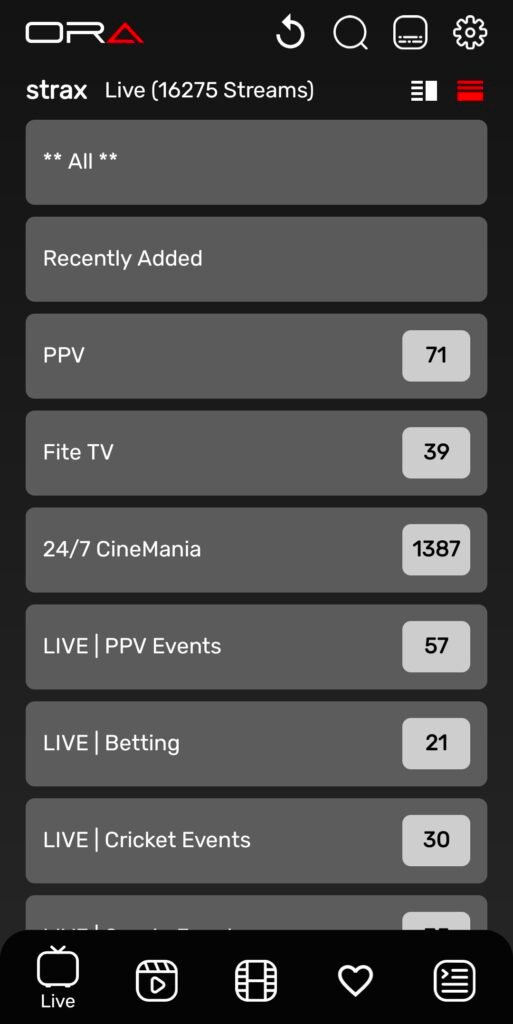
Amazon Firestick / Fire TV Use Ora Player or IPTV Smarters Pro. Ora Player is the better interface by a significant margin — cleaner EPG layout, better buffer control, faster channel switching. The free version is usable but the premium version (around $5/year) unlocks multiple playlist support and recording.
To install Ora Player on Firestick: go to Settings → My Fire TV → Developer Options → enable “Apps from Unknown Sources,” then use the Downloader app to sideload Ora Player‘s APK. This took me about 8 minutes the first time.
Android TV / Box Same apps apply. Ora Player installs directly from the Play Store on Android TV — no sideloading needed. Much easier.
Smart TV (Samsung / LG) Samsung Tizen and LG WebOS both support IPTV apps, but your options are more limited. Smart IPTV is the most widely used. You install it from the app store, then register your TV’s MAC address on the developer’s website, and upload your M3U link there. It’s a slightly awkward process — the MAC registration step confuses a lot of people — but it works once you get through it.
iPhone / Android Phone GSE Smart IPTV on iOS or IPTV Smarters on Android are solid choices for mobile. Useful when travelling.
Step 3 — Adding Your Playlist
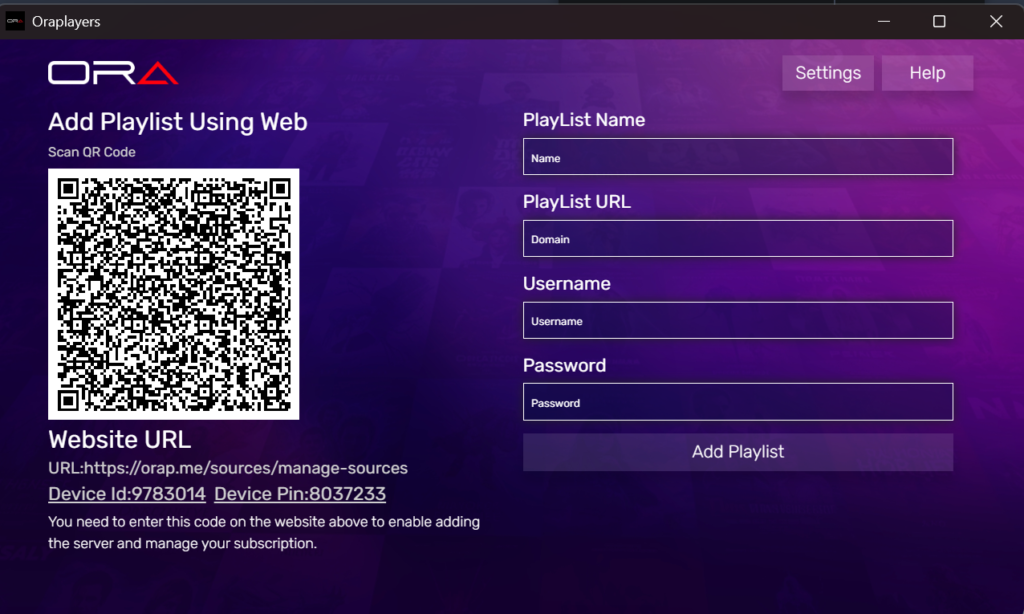
Inside Ora Player (using this as the example since it’s the most common):
- Open the app → tap Add Playlist
- Select M3U URL or Xtream Codes depending on what your provider gave you
- Paste your URL or enter the server/username/password fields
- The app will fetch and parse the playlist — on a fast connection this takes 15–30 seconds for a large list
- Once loaded, go to Settings → EPG and paste your EPG URL
- Tap Update EPG — this can take 1–2 minutes to fully populate
After that, your channel list appears. Search for “Pro” or “Antena” or “TVR” to filter Romanian channels quickly.
Step 4 — Organize Your Romanian Channels
Most IPTV lists dump thousands of channels in alphabetical or random order. Romanian channels get buried.
In Ora Player : go to Channels → Groups, find the group your provider labeled for Romanian content (often “RO,” “Romania,” or “Romanian”), and mark it as a Favourite Group. This pins it to your main sidebar.
Then go through the Romanian group and mark individual channels as favourites. Your shortlist ends up accessible in under two clicks from the home screen.
Romanian Channels Worth Knowing About
Most guides list the same five channels. Here’s a slightly more complete picture:
| Channel | What It’s Actually For |
|---|---|
| Pro TV | Romania’s most-watched channel. Drama series, prime-time shows, news at 19:00 |
| Antena 1 | Reality TV, game shows, tabloid-ish entertainment |
| Digi 24 | Rolling news, good for staying up to date. Fast-paced format |
| TVR 1 | Public broadcaster. More documentaries, cultural programming, sports rights |
| Antena 3 CNN | Political commentary, long-format talk shows. Polarizing but widely watched |
| ProCinema | Film-focused channel, often airs Hollywood releases with Romanian subtitles |
| Digi Sport 1/2 | Football coverage, Romanian league (SuperLiga), Champions League highlights |
| Kanal D | Turkish drama reruns dubbed in Romanian. Surprisingly popular |
What Most IPTV Reviews Don’t Tell You
This is the part that took me longer to figure out than it should have.
1. Stream quality varies by time of day This is provider-dependent but almost universal. Peak hours for Romanian viewers — roughly 19:00–23:00 EET — put more load on streams. I’ve seen Pro TV drop from HD to SD automatically during Vocea României final episodes because server demand spikes. If you’re experiencing buffering only in the evenings, this is usually why. Some providers handle it better than others; it’s worth asking in trial periods specifically.
2. The EPG is almost never perfect for Romanian channels Expect gaps. TVR channels in particular seem to have patchy EPG data across most providers. Recordings you set based on EPG timings sometimes miss the first 2–3 minutes of a show. Set a 5-minute buffer if your app supports it.
3. Channel numbering means nothing Romanian providers sometimes number channels inconsistently. “Pro TV” might appear at position 1 on one device and position 847 on another, depending on how the M3U is ordered. Use the search function rather than scrolling.
4. Some providers throttle streams after a certain watch time One provider I used started degrading quality after roughly 4 hours of continuous viewing on the same stream. This only showed up during a football match I was watching. Restarting the stream fixed it, but I hadn’t seen it documented anywhere.
Real Setup Mistakes I Made (And How to Fix Them)
Mistake 1: Not enabling hardware decoding In Ora Player , go to Settings → Player → Hardware Decoding and enable it. Without this, 1080p streams can stutter on lower-powered devices like older Firesticks. Enabling it cut my buffering on HD channels by about 80%.
Mistake 2: Forgetting to refresh the playlist M3U playlists change. Providers update stream URLs, add channels, remove dead ones. Ora Player lets you set an auto-refresh interval — I have mine set to refresh every 24 hours at 3:00 AM. Without this, you’ll periodically find channels that used to work have gone black.
Mistake 3: Using WiFi instead of Ethernet for a Firestick An Ethernet adapter for Firestick costs around £10–12. Connecting directly cut my occasional buffering spikes almost entirely on 1080p streams. WiFi interference in apartments especially causes inconsistent stream quality even when your speed test looks fine.
Mistake 4: Trusting the channel count in advertisements “5,000+ channels” means very little. What matters is how many of those channels are active, stable, and in HD. Ask for the specific Romanian channel list during your trial rather than trusting the headline number.
Who This Setup Is NOT For
Be honest with yourself before going down this road:
- If your internet is below 25 Mbps reliably — HD streams need 8–15 Mbps per stream. Below 25 Mbps with household usage competing, you’ll buffer constantly.
- If you want something completely plug-and-play — IPTV requires occasional maintenance. Playlists update, EPGs break, providers change server infrastructure. It’s not Netflix-level frictionless.
- If you need content guaranteed to be legal in your jurisdiction — The legality of IPTV subscriptions is a grey area in many countries. This article doesn’t constitute legal advice, and you should check the rules where you live.
- If you only want one or two channels — At that point, a VPN plus the broadcaster’s own app might actually be simpler.
Frequently Asked Questions
Can I watch Romanian IPTV channels in the UK or US? Yes, and this is one of the primary reasons people use IPTV for Romanian content. Geographic restrictions on Romanian broadcasters’ own apps don’t apply in the same way through IPTV services.
How much does IPTV with Romanian channels typically cost? Most providers offering Romanian channels range from £5–£15 per month, depending on the total channel package and number of simultaneous connections. Annual plans are usually 30–40% cheaper.
Do I need a VPN with IPTV? Not strictly required for streams to work, but some users prefer one for privacy. A VPN can also occasionally improve stream quality if your ISP throttles streaming traffic — though it can also add latency. Test both ways.
What’s the best device for IPTV? Amazon Firestick 4K Max with a wired Ethernet adapter is a solid and affordable choice. Android TV boxes give you more flexibility. Avoid older Firestick models (pre-2021) for 1080p Romanian channels — the processor struggles with hardware decoding.
The EPG for Romanian channels isn’t loading — what do I do? First, check that your EPG URL is correctly entered in your IPTV app. Second, try manually forcing a refresh. If it still fails, contact your provider — EPG feeds for Romanian channels sometimes have separate URL formats that differ from the standard xmltv endpoint.
My stream keeps buffering even though my internet is fast — why? The issue is almost always one of four things: WiFi instability (switch to wired), hardware decoding disabled (enable it in app settings), provider server load during peak hours (try a different server if your provider offers one), or the stream source itself being low quality. Work through each in that order.
Can I record Romanian TV shows through IPTV? Yes, if your app supports it. Ora Player Premium allows recording to external storage. You’ll need a USB drive connected to your device. EPG-based recording works but add a few minutes of buffer due to schedule inaccuracies on Romanian channels.
Getting Romanian television over IPTV isn’t complicated once you know what to look for — but it does require picking the right provider, using the right app, and fixing a few settings that nobody mentions in the standard setup guides. The steps above reflect what actually worked after testing multiple services and making the usual mistakes along the way.