Living outside Portugal doesn’t mean losing access to the TV you grew up with. Whether you’re an expat in London, a traveller in Southeast Asia, or just someone who wants RTP and Sport TV without paying for a satellite dish, IPTV has become the most practical solution most people aren’t fully using yet.
This guide covers what actually matters: which channels to look for, how setup works on different devices, what to watch out for when choosing a provider, and how to get a trial before spending anything.
What Makes IPTV Different From Standard Streaming
IPTV delivers television channels over your internet connection instead of through cable or satellite infrastructure. The result is a subscription that works on virtually any screen you own — smart TV, phone, tablet, laptop, Amazon Firestick — without any physical installation required.
For Portuguese viewers specifically, this matters because the alternative options are genuinely poor. Satellite coverage outside Europe is patchy and expensive. Most catch-up apps for RTP and SIC are geo-restricted outside Portugal. IPTV sidesteps both problems.
The trade-off is that quality depends on your internet connection and the provider’s server reliability. A strong connection — ideally 25Mbps or above for HD content — is enough for smooth playback. The provider’s infrastructure does the rest, which is why choosing carefully matters.
Portuguese Channels Worth Checking For
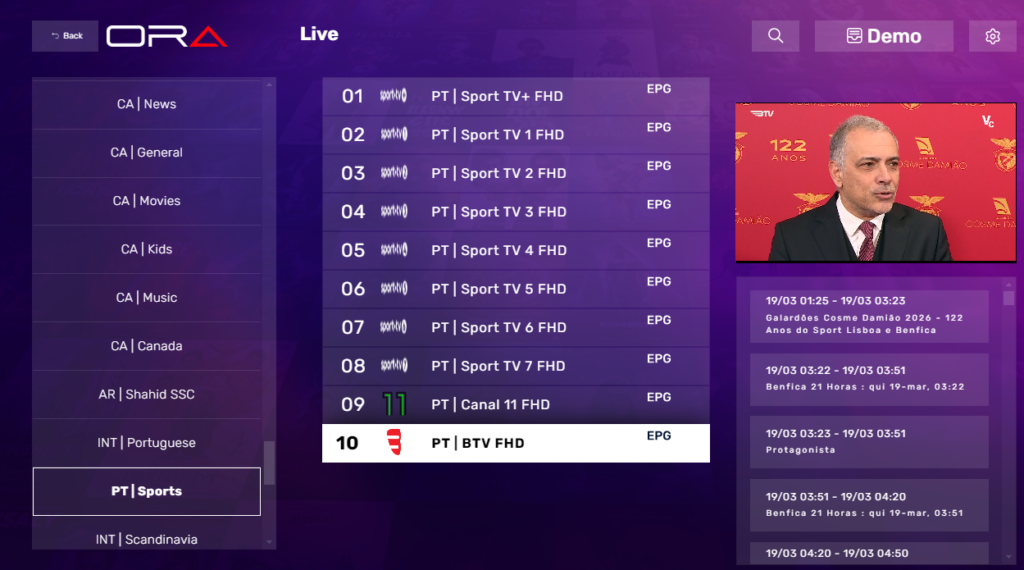
Before evaluating any provider, it helps to know which channels you’re actually looking for. Not every service carries the full Portuguese lineup, and channel availability is one of the first things to verify during a trial.
General and news channels: RTP 1, RTP 2, SIC, TVI, CMTV, RTP Internacional, SIC Notícias, TVI 24. These are the baseline. Any provider marketing themselves as a Portuguese IPTV service should have all of these working reliably.
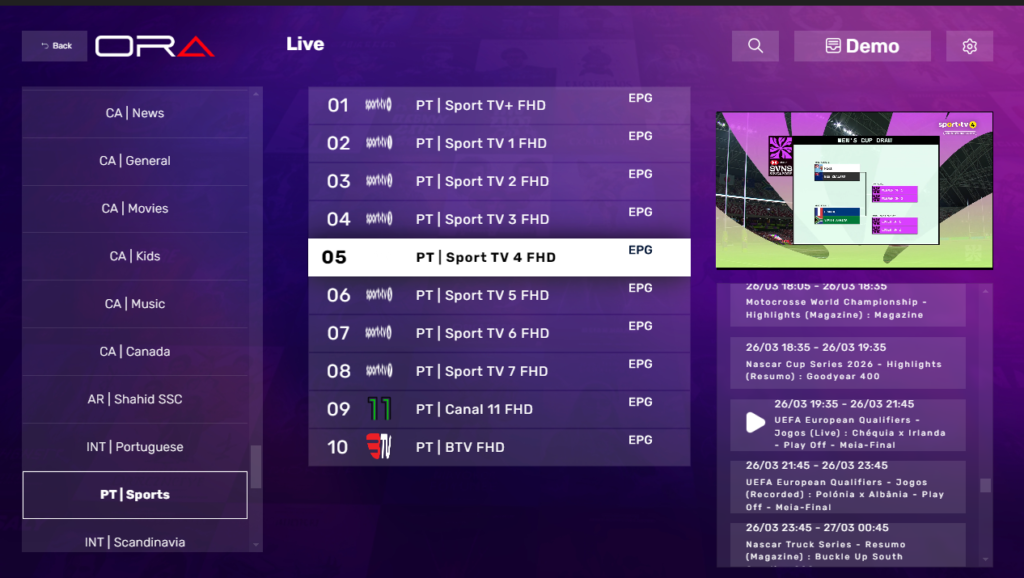
Sports: Sport TV Portugal (multiple channels), Eleven Sports Portugal, Benfica TV, Porto Canal. If you watch Liga Portugal football or Formula 1 on Portuguese broadcasts, these are non-negotiable. Test them specifically during a live match rather than off-peak — sports streams under load behave very differently from sports streams at 11am on a Tuesday.
Entertainment and movies: TVCine (multiple channels), AXN Portugal, Fox Portugal, Canal Hollywood. These vary more between providers, so check specifically if you rely on any of them.
Brazilian content: Many Portuguese viewers also want access to Globo, SBT, and Record TV. Not all providers include these by default — worth confirming before subscribing.
How to Set Up IPTV for Portuguese Channels
Setup is straightforward regardless of which device you’re using. The process is the same across providers — they give you credentials, you enter them into an app.
Step 1: Choose your app. The most widely used options are TiviMate (Android and Android TV), IPTV Smarters Pro (multi-platform), and GSE Smart IPTV. TiviMate has the cleanest interface and the best EPG handling in my experience. IPTV Smarters works well if you’re on iOS or a less common device.
Step 2: Get your credentials from your provider. You’ll receive either an M3U URL or Xtream Codes login details (a server address, username, and password). Both formats work with all the apps mentioned above.
Step 3: Enter credentials in the app. In TiviMate, go to Settings → Playlists → Add Playlist, then paste your M3U URL or enter your Xtream Codes details. The app loads your channel list automatically — this usually takes 30–60 seconds depending on how large the channel list is.
Step 4: Organise your favourites. Once loaded, find your Portuguese channels and add them to a favourites list. With large channel lists, browsing without favourites becomes genuinely tedious.
The whole process from download to watching takes about 10 minutes on the first setup.
Device Compatibility: What Works and What to Watch For
Most IPTV services support the same core set of devices. Here’s what to expect on each:
Amazon Firestick: Works well with IPTV Smarters Pro, available directly from the Amazon Appstore. TiviMate requires a slightly longer installation process via sideloading but is worth it for the interface improvement. The Firestick is probably the most common device used for IPTV in the UK and Portugal.
Android TV / Smart TV with Google TV: TiviMate installs directly from the Play Store. Performance is generally excellent. Samsung and LG TVs running their own operating systems require either a compatible app from their store or a workaround via Chromecast or a connected Android box.
iPhone and iPad: IPTV Smarters Pro is the most reliable option on iOS. The App Store version works well. GSE Smart IPTV is an alternative.
Laptop and desktop: Any browser-compatible player works, or you can run IPTV Smarters via an Android emulator. Most people find a dedicated device (Firestick, phone, TV) more convenient for regular viewing.
MAG boxes: These are dedicated IPTV set-top boxes. They require a separate MAG line from your provider rather than M3U credentials. If you’re already using a MAG box, confirm your provider supports it before subscribing.
Using a VPN for Access Outside Portugal
If you’re outside Portugal and certain channels have geo-restrictions layered on top of your IPTV access, a VPN with a Portuguese server can help. This applies more to catch-up and VOD content than live channels — most IPTV providers route live streams through their own servers regardless of your location.
NordVPN, ExpressVPN, and Mullvad all have Portuguese servers. For streaming specifically, NordVPN and ExpressVPN are more consistently fast. Connect to a Lisbon or Porto server before launching your IPTV app.
One thing worth noting: using a VPN can sometimes slow down streaming enough to cause buffering, particularly on lower-tier VPN plans. If this happens, try a different server location or switch to a wired connection if you’re on Wi-Fi.
What to Test During a Free Trial
Most reputable providers offer a trial period of 6 to 24 hours. Use that window deliberately rather than just watching casually.
Test Sport TV Portugal and Eleven Sports during a live broadcast if timing allows — sports streams are the most demanding and the most telling. Check that RTP Internacional loads cleanly since it’s the channel most Portuguese expats rely on. Run through your full list of required channels rather than assuming they work because they appear in the guide.
Test on all devices you plan to use regularly. A service that works perfectly on a Firestick can behave differently on a smart TV or phone. The EPG is also worth checking — accurate programme scheduling matters for regular daily use, and some providers have unreliable EPGs even when streams themselves are fine.
If buffering occurs during the trial, adjust your app’s buffer settings before blaming the provider. In TiviMate, this is under Settings → Player → Hardware Acceleration and Buffer Size. Increasing the buffer size resolves a lot of minor freeze issues that aren’t actually server problems.
Pricing: What to Expect in 2025
IPTV Portugal subscriptions typically fall within these ranges:
| Plan | Typical Price Range |
|---|---|
| 1 Month | £14.99 – £17.99 |
| 3 Months | £30 – £40 |
| 12 Months | £55 – £65 |
Anything significantly below this range warrants extra scrutiny. Providers operating at £5/month or offering “lifetime” plans aren’t covering real infrastructure costs through legitimate means — and services running on those economics tend to disappear without warning.
Pay month-to-month until you’ve used a service for at least 60–90 days and are confident in its reliability. Then consider a longer plan for the savings. Paying a year upfront on a new provider is a genuine risk.
What Most Provider Comparisons Skip
A few things that rarely appear in standard IPTV Portugal guides but matter in practice:
Peak-time performance varies wildly between providers. A service that streams perfectly at 2pm on a Wednesday can struggle significantly at 9pm on a Saturday during a Benfica match. The only way to test this is to watch live sports at peak times during your trial.
Some providers inflate channel counts. A listing of 10,000+ channels sounds impressive, but what matters is how many of those actually work reliably. Focus on the specific channels you need rather than total count.
Customer support response time is a real differentiator. When a stream goes down before a live match, you need someone to respond quickly. Test support during your trial by sending a genuine question. The response time you get then is roughly what you’ll get after you’re a paying customer.
Auto-renewal terms vary. Some providers auto-renew, others don’t. Read the terms before subscribing, particularly if you’re paying via PayPal or card.
Frequently Asked Questions
Is IPTV legal in Portugal? Using a licensed IPTV service that has paid broadcast rights for its content is legal. Services that redistribute content without authorisation operate in a legal grey area or outright illegally depending on jurisdiction. Stick to providers who charge reasonable rates and operate transparently — pricing that seems too low to be sustainable usually means the content isn’t licensed properly.
Can I watch on multiple devices at the same time? Most providers allow one or two simultaneous connections on a standard subscription. Additional connections may require a higher-tier plan. Confirm this before subscribing if you intend to watch on multiple screens in your household simultaneously.
Do I need a VPN? Not always. Most IPTV providers route streams through their own servers, so geo-restrictions on individual channels are often bypassed automatically. A VPN becomes relevant if you encounter specific content blocks or want additional privacy. It’s not a mandatory requirement for most users.
Why do streams buffer during football matches but not at other times? Server load. Live sports broadcasts draw huge simultaneous viewer numbers, and providers with under-provisioned infrastructure struggle to handle the demand. This is one of the most important things to test during a trial — specifically during live match broadcasts, not during quiet periods.
What’s the best app for watching IPTV Portugal on a Firestick? TiviMate is the top choice for regular use — clean interface, excellent EPG, reliable playback. IPTV Smarters Pro is a solid alternative and easier to install on Firestick via the Amazon Appstore. Both support M3U and Xtream Codes.
How do I find channels after loading a large playlist? Use the search function within your app, or set up a dedicated favourites group for Portuguese channels during initial setup. Scrolling through thousands of channels without favourites becomes impractical quickly.
What internet speed do I need? For HD streams: 15–20 Mbps. For 4K: 40 Mbps or above. For households watching on multiple devices simultaneously, factor in the combined load. A wired ethernet connection is more reliable than Wi-Fi for live sports in particular.