A hands-on walkthrough for IPTV resellers — from panel login to sending that first trial link.
Most guides on IPTV trial setup read like they were written by someone who never actually touched a reseller panel. This one is different. What follows is based on real time spent inside the dashboard — clicking through menus, making mistakes, and figuring out what actually works.
If you’re here, you probably already have a reseller account or are close to getting one. Good. Let’s skip the theory and get into the specifics.
What an IPTV Reseller Actually Does (And What You’re Responsible For)
An IPTV reseller buys credits from a parent provider — usually in bulk — then creates and sells individual subscriptions to end users. You’re essentially a middleman with your own customer-facing operation.
Your reseller panel is where everything happens. Think of it as a lightweight CRM crossed with a streaming backend. From there, you create user accounts, assign packages, set expiry dates, monitor active connections, and generate trial lines.
The key thing most newcomers underestimate: you are responsible for your customers’ experience. If streams buffer, if a channel is down, if setup is confusing — that’s your problem to solve, not your provider’s. Choosing the right parent provider matters enormously here.
- Look for providers who have been operating for at least 12–18 months.
- Check if their panel has uptime monitoring or at least visible server status.
- Avoid any provider who only accepts cryptocurrency with no other payment option — that’s a major red flag.
- Test their trial system yourself before selling to a single customer.
Azeem Panel Providers specifically have built a reputation for panel stability and clean user interfaces. That matters when you’re trying to spin up a trial in 60 seconds during a live chat conversation with a potential customer.
Why Trials Convert — And What the Data Actually Shows
The logic here is simple: people don’t trust what they can’t test. IPTV is an especially skeptical market because buyers have been burned before by low-quality providers.
Offering a trial removes that friction entirely. When a prospect can verify your stream quality, browse your channel list, and test playback on their own device — without handing over money first — the trust barrier drops dramatically.
Conversion Rate Data by Trial Length
| Trial Duration | Avg. Conversion Rate | Est. Customer Lifetime Value | Key Insight |
|---|---|---|---|
| 6-Hour Trial | 65% | $180 | High urgency drives fast, decisive sign-ups. |
| 24-Hour Trial | 55% | $165 | More breathing room, but urgency fades. |
| 48-Hour Trial | 40% | $150 | Attracts freebie-seekers more than buyers. |
| No Trial Offered | 5% | $90 | Relies entirely on trust you haven’t earned yet. |
The six-hour trial consistently outperforms longer ones. Why? Because it creates genuine urgency. The customer has a narrow window to evaluate — and that window naturally filters out people who are just hunting for free access.
That said, 24-hour trials are the most common in the market and still convert well. Most of my own early customers came through 24-hour demos.
Step-by-Step: Creating a Trial Inside Your Reseller Panel
I’m walking through this using the Azeem panel interface, which is the most widely used among serious resellers. Other panels follow a similar structure, though button labels may vary slightly.
Step 1: Log In and Get to the Users Section
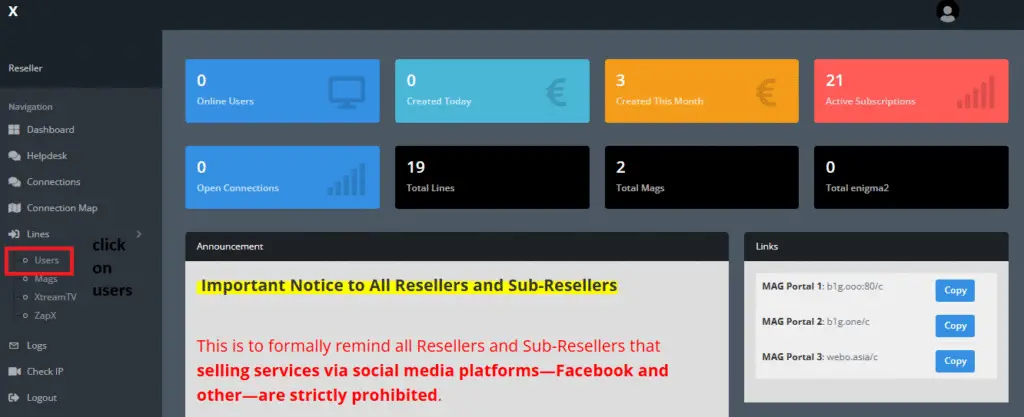
Open your panel URL and enter your credentials. On first load, the dashboard takes about 3–4 seconds to fully populate — it’s pulling live stats, so don’t panic if it feels slow.
Once you’re in, look at the left-side navigation. You’ll see a menu with sections like Dashboard, Users, Bouquets, and Settings. Click on Users. This is your main working area for everything customer-related.
Step 2: Find the ‘Add Trial User’ Button
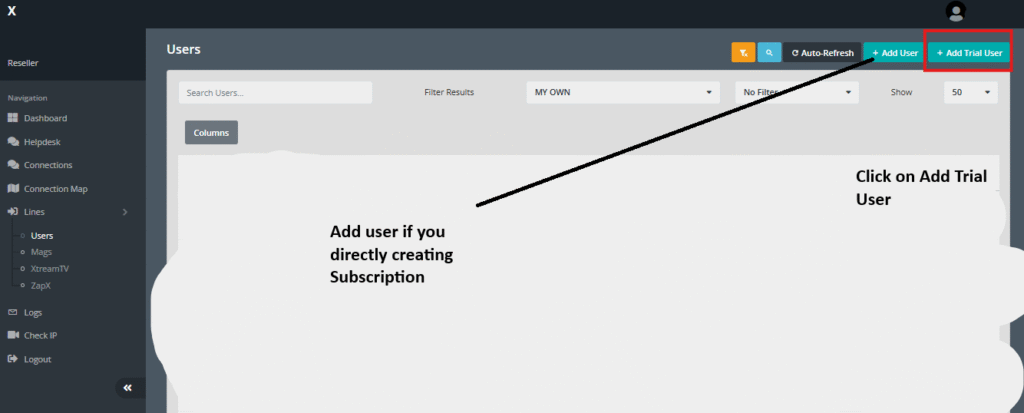
Inside the Users section, you’ll see a list of all existing accounts. At the top-right, there are action buttons. Look specifically for ‘+ Add Trial User’ — it’s distinct from ‘+ Add User’. The difference matters.
The trial button opens a pre-configured creation form optimised for time-limited accounts. Using the regular Add User button for a trial is technically possible but adds unnecessary steps.
Step 3: Set the Line Type
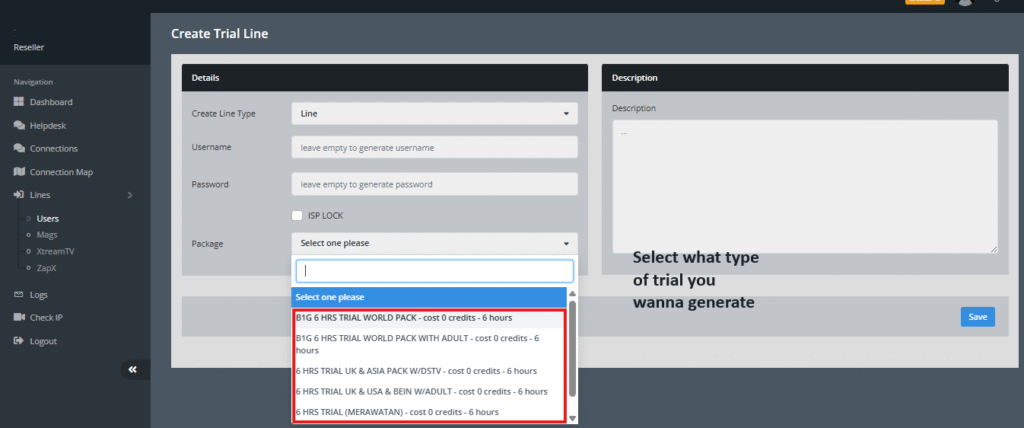
The creation form opens with a ‘Create Line Type’ dropdown at the top. For most customers on standard IPTV apps — TiviMate, IPTV Smarters, Kodi — you’ll select ‘Line’. This generates an M3U URL that works across nearly all players.
MAG lines are for set-top box users. If you’re not sure what your customer is using, default to Line. You can always create a second trial in a different format if needed.
Step 4: Username and Password Fields
Here’s a time-saving tip: leave both fields blank. The panel will auto-generate a clean, randomised username and password. This took me a few days to figure out on my own because the fields look mandatory.
If you’re onboarding someone with a specific branding preference or you want predictable credentials, go ahead and enter custom values. Otherwise, let the system handle it — it takes a second rather than 15.
Step 5: Select the Package
The Package dropdown controls duration, channel access, and server routing. Click ‘Select one please’ and a list of your provider’s available trial options appears.
These are defined by your parent provider, not by you. You’ll typically see options like ‘B1G 6 HRS TRIAL WORLD PACK’ or ’24 HRS TRIAL EU PACK’. The naming convention tells you both the duration and the content scope.
Choose the package that matches what you promised the customer during your pre-sales conversation.
Step 6: Customise the Bouquet (Advanced)
After selecting a package, you’ll see two columns: NOT IN and IN. The IN column lists all channel groups currently included in the trial.
This is where you can get targeted. If you’re trying to close a customer in Portugal, you can remove irrelevant bouquets and make sure Sport TV, Eleven Sports, and RTP are visible. If your customer is a US sports fan, prioritise ESPN, NFL, NBA.
I’ll be honest — most beginners skip this step entirely. That’s fine. But the resellers I’ve seen with the highest conversion rates always spend 60 seconds tailoring the bouquet. It signals to the customer that you know your product.
Step 7: Save and Confirm
Review your settings one final time — package, duration, bouquets. Then scroll to the blue Save button at the bottom and click it.
The panel processes this almost instantly. I’ve clocked it at under two seconds on a normal connection. After saving, you’re redirected back to the Users list, and your new trial account appears at the top of the table.
Step 8: Copy and Send the M3U Link to Your Customer
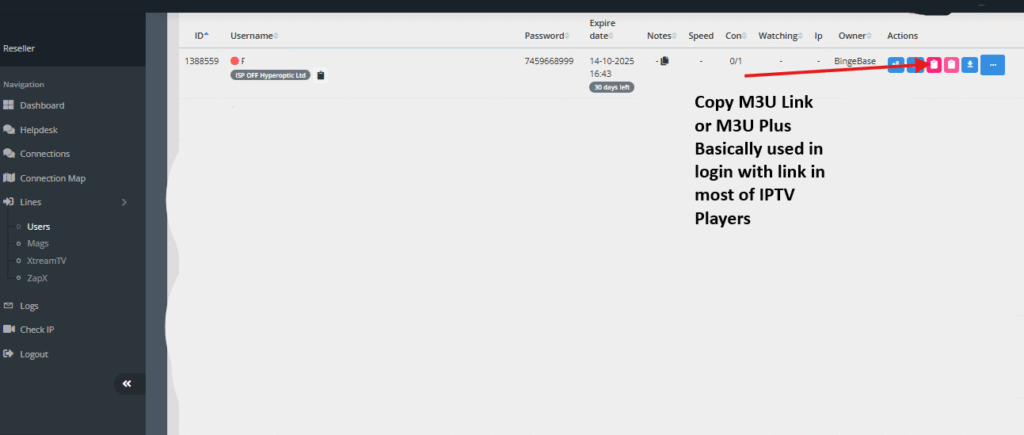
On the trial user row, look at the Actions column. There’s a small icon that exposes the M3U Plus link for that account.
Click it, copy the full URL, and paste it directly into your messaging app — WhatsApp, Telegram, whatever channel you’re using with that customer. The whole process from login to sending the link takes me about 90 seconds now. First time, expect 5–7 minutes while you find your way around.
Give the customer a brief note about which app to use. TiviMate on Android is my usual recommendation — it’s clean, handles EPG well, and most customers figure it out within 10 minutes.
Panel Features That Actually Matter for Resellers
| Feature | Azeem Panel | Generic Panel | Why It Matters |
|---|---|---|---|
| Instant Trial Generation | Yes | Often manual | Lets you act on a hot lead immediately. |
| M3U + MAG Format Support | Both | Usually M3U only | Covers more device types without workarounds. |
| Bouquet Editor | Advanced | Basic or none | Enables personalised trials for specific markets. |
| Usage Analytics | Yes | Rarely | Shows what channels customers actually watch. |
| Geo-Lock / IP Lock | Yes | No | Prevents account sharing on trials. |
| Auto-Credential Generation | Yes | Inconsistent | Saves setup time during high-volume periods. |
How to Follow Up After Sending a Trial
Creating the trial is the easy part. Converting it into a paying subscription requires a bit of active effort. Here’s what actually works.
- Send the trial link with a setup guide. A simple 3-step message covering ‘download TiviMate → open app → paste link’ eliminates 80% of follow-up questions.
- Check the panel about 2 hours in to see if they’ve logged on. If they haven’t connected, reach out and ask if they need help. Most won’t reply unprompted.
- Around hour 20 of a 24-hour trial, send a short message: ‘How’s the quality looking? Ready to set you up on a monthly plan?’
- Offer a small incentive at conversion — not a discount exactly, but maybe an extra month thrown in on a 3-month package. That feels more like value than desperation.
One thing I noticed: customers who needed help during setup almost always converted. The friction of needing assistance created a touch point, which created rapport. Don’t be afraid of support conversations — they’re opportunities.
Setting Up Trials for Specific Markets: Portugal and USA
Your panel’s bouquet editor lets you build market-specific trial packages. This takes maybe 5 minutes to configure and makes a material difference in conversion rates for regional customers.
| Market | Key Sports Channels | Key Movie/Entertainment | Key News/General |
|---|---|---|---|
| USA | NFL, NBA, MLB, ESPN VIP | HBO, Showtime, Starz | FOX News, CNN, ABC, NBC |
| Portugal | Sport TV, Eleven Sports, BTV | TVCine, Hollywood channels | RTP, SIC, TVI, CMTV |
| UK | Sky Sports, TNT Sports | Sky Cinema, Film4 | BBC One, ITV, Sky News |
When you’re targeting the Portuguese market specifically, also make sure Brazilian channels are accessible if your provider includes them — there’s significant overlap in demand. A lot of resellers miss that.
What Most IPTV Reseller Guides Won’t Tell You
This is the section I wish had existed when I started. Some of these things took months to learn.
The 48-Hour Trial Is Usually a Mistake
It sounds more generous, but in practice it attracts the wrong people. The conversion rate data backs this up — 40% versus 65% for the six-hour option. People who need 48 hours to ‘decide’ have usually already decided they’re not paying.
Stick to six or 24 hours unless you have a specific reason to extend.
Your Panel Will Lag on First Load — That’s Normal
Every reseller panel I’ve used takes 3–8 seconds to fully render after login. New resellers sometimes assume something is broken and start refreshing compulsively. It’s fine. The dashboard pulls live connection counts and server stats, which takes a moment.
If it takes more than 15 seconds or throws an error, then you have a real issue.
Forgetting to Enable Buffer Control Breaks Streams
This is one of the most common setup mistakes I’ve seen. Most IPTV apps have a buffer or cache setting. If a customer complains about freezing on otherwise stable streams, the first fix is almost always adjusting the buffer size inside their player — not a problem with your server.
Include a note about buffer settings in your onboarding message. It saves you a lot of follow-up.
Don’t Ignore the IP Lock Feature
If you’re offering free trials, some users will share the credentials with three or four friends. The IP lock feature in panels like Azeem’s prevents simultaneous connections from different IPs. Enable it on trial accounts. Otherwise, one ‘customer’ can drain your trial credits serving their entire household.
Analytics Tell You What to Sell
The usage analytics panel shows which channels and bouquets each user actually accessed during their trial. This is genuinely useful. If a trial user spent their entire 24 hours watching one sports package, your follow-up pitch should open with that package. It’s not complicated, but almost no one does it.
Choosing a Provider You Can Actually Rely On
The legal and operational landscape for IPTV reselling varies considerably by jurisdiction. What’s important from a practical standpoint is partnering with a provider who is transparent and professionally run.
| Characteristic | Red Flag | Green Flag |
|---|---|---|
| Pricing | Lifetime deals, suspiciously cheap tiers | Clear monthly/annual pricing with tier breakdowns |
| Website & Support | Poor grammar, no contact channel | Professional site, ticketing or live chat available |
| Payment Methods | Crypto only, no alternatives | PayPal, card, crypto — multiple options |
| Trial Policy | No trial system at all | Automated trial generation, no manual approval |
| Response Time | 24+ hours or silence | Under 4 hours on support tickets |
A provider who offers a clear refund policy and multiple payment channels is demonstrating that they operate like a real business. That matters when you’re building your own customer relationships on top of their infrastructure.
FAQ: Common Questions From New Resellers
How many trial accounts can I create per day?
It depends on your specific reseller agreement with your parent provider. Most established panels impose monitored daily limits — not restrictively low, but enough to prevent abuse. If you’re running a legitimate sales operation, you won’t hit the ceiling.
Can I convert a trial account to a paid subscription without creating a new user?
Yes, and this is one of the cleaner workflows in a good panel. Find the trial user in your list, use the edit function, swap the package to a paid tier, and update the expiry date. No need to send new credentials. The customer’s existing M3U link continues to work.
A user is sharing their trial credentials with others. What can I do?
From your panel, check the active connections column on that user’s account. If you see multiple simultaneous connections from different IPs, it’s being shared. You can disable the line instantly from the Actions dropdown. If your panel supports IP lock, enable it before you send the next trial.
Do I need technical knowledge to run an IPTV reselling business?
Not much, honestly. Modern panels are built for non-technical operators. The dashboard is point-and-click. Where you’ll invest most of your time is in customer communication, sales, and following up on trials — not troubleshooting servers.
What’s the most common reason trials don’t convert?
No follow-up. The reseller sends the link, waits, hears nothing, and assumes the customer wasn’t interested. In most cases, the customer experienced minor friction during setup and just moved on. A single follow-up message within the first four hours of the trial dramatically changes outcomes.
Is 24 hours or 6 hours better for conversion?
Six hours converts at a higher rate when you’re actively following up. If you know you won’t be available to respond within that window, 24 hours is safer. The trial duration only works in your favour if you’re present during it.
Final Thoughts
The mechanics of setting up an IPTV trial are genuinely straightforward once you’ve done it a couple of times. The steps above should take you from zero to a working trial link in under five minutes on your first attempt.
Where most new resellers lose momentum isn’t the technical side — it’s the follow-up. Send the link, stay available for setup questions, check in during the trial window, and have a clear offer ready when the clock runs out. That loop, repeated consistently, is what builds a reseller business worth having.
Pick a panel with proper trial management tools, take the bouquet customisation seriously for your target market, and don’t skip the follow-up. The rest tends to fall into place.